To print your pattern at actual size, open the PDF in your web browser, on a computer: there is no software to install or buy. In Chrome and Edge, the file sets the scale itself, so you just leave it alone. In Firefox and on a Mac, there is one setting to change. Either way, print the first page on its own and measure its test square: if it measures 5 cm on each side, the whole pattern will be right.
Before you start: a computer and the right paper size
Print from a computer. From a phone or tablet, the print window usually has no scale setting at all and shrinks the page without telling you. Also check that your printer holds A4 paper (the pattern is split into A4 pages to tape together).
Ready to go from reading to sewing? The verdict on your photo costs you nothing: you only pay when you order the pattern.
Create my made-to-measure patternChrome or Edge: the file sets itself
On Windows, a PDF usually opens in Edge; on a Mac, right-click the file, choose ‘Open With’, then Chrome. Edge and Chrome share the same print window.
1. Open the print window. Click the printer at the top right of the PDF, or press Ctrl + P (Cmd + P on a Mac).
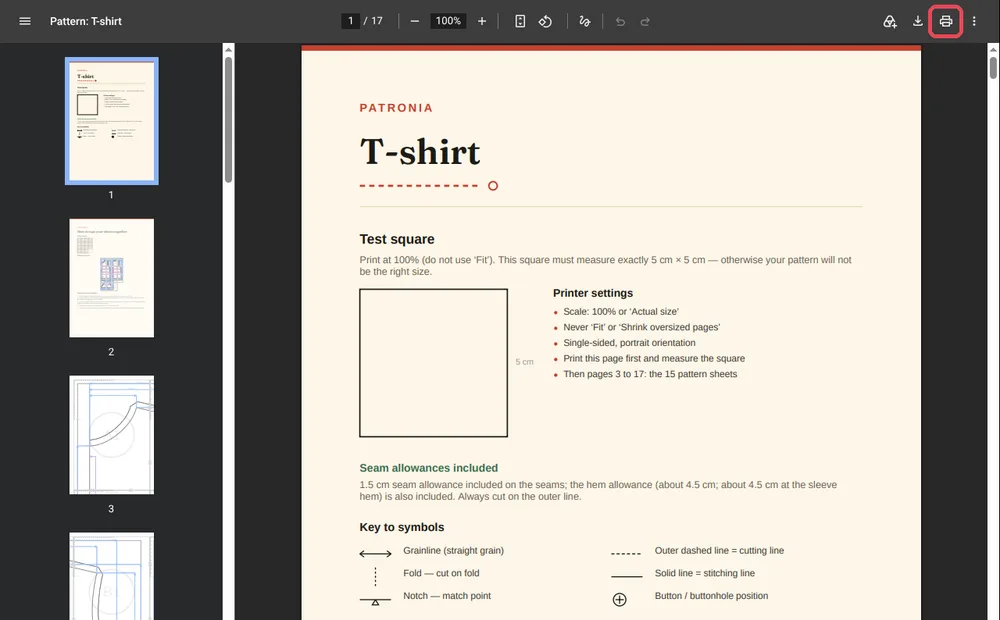
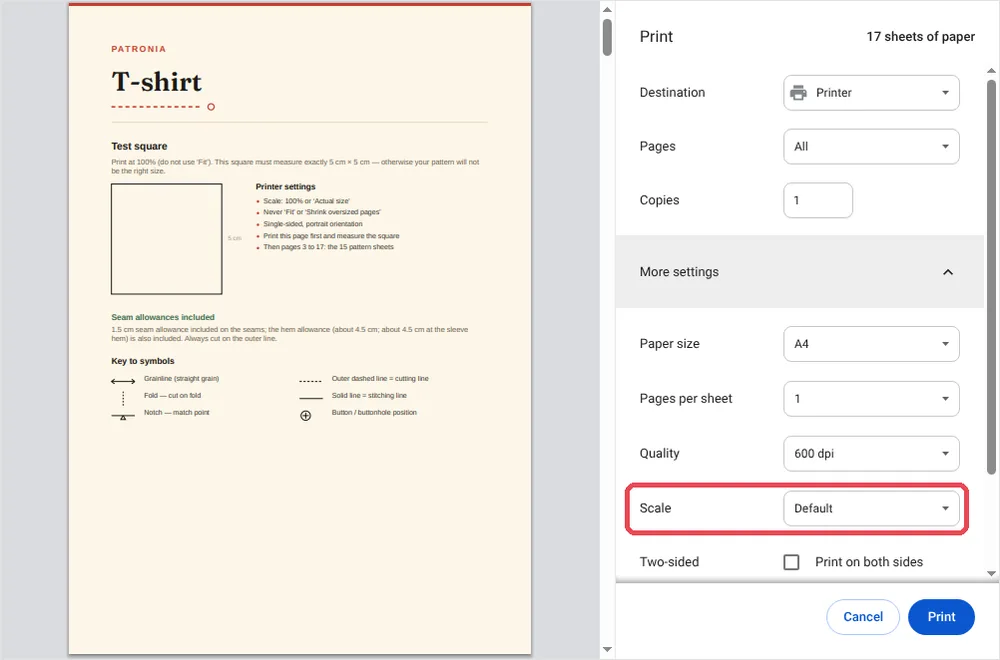
2. Open ‘More settings’. Check three lines: ‘Paper size’ on A4, ‘Scale’ on ‘Default’, and ‘Two-sided’ unticked. ‘Default’ prints our patterns at actual size, because the file asks Chrome to. If your version offers ‘Actual size’, pick it: it does the same thing.
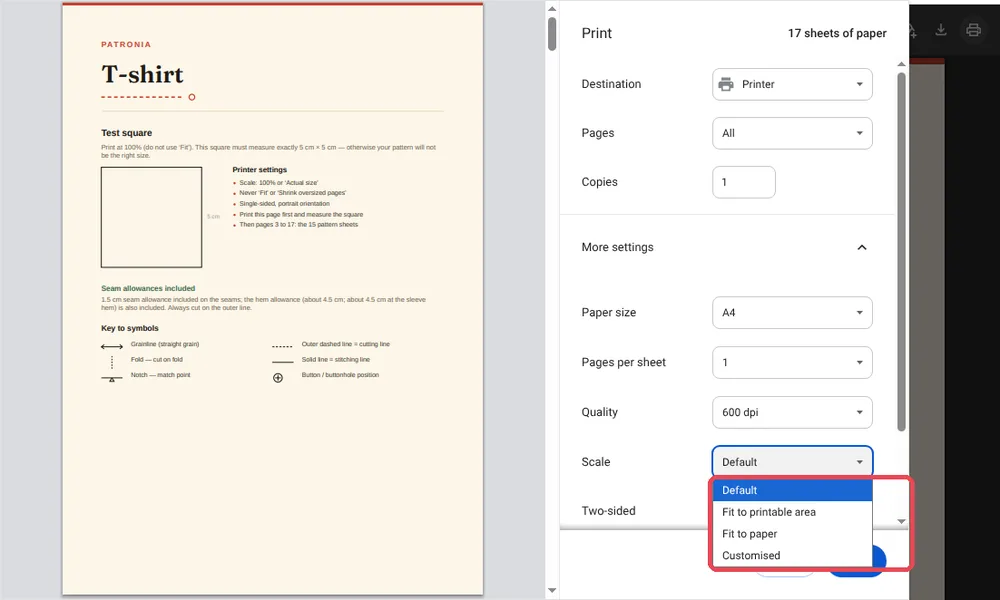
3. Avoid both ‘Fit’ options. ‘Fit to printable area’ and ‘Fit to paper’ shrink the pattern. If either is selected, go back to ‘Default’.
4. Print page 1 on its own, then measure. Under ‘Pages’, choose ‘Customised’ and type 1. Measure the square with a ruler: 5 cm on each side? Switch back to ‘All’ and print the rest without touching any other setting.
Firefox: set the scale to 100
Firefox ignores the file's request, so you set it yourself. Press Ctrl + P (Cmd + P on a Mac), then open ‘More settings’. On the ‘Scale’ line, select the second option and type 100, instead of ‘Fit to page width’. Keep ‘Paper size’ on A4, then print page 1 and measure the square.
On a Mac with Preview or Safari
Preview, the app a Mac opens by default, ignores the file's request too. Press Cmd + P, then click ‘Show Details’ if the window is collapsed. In the scale field, type 100 %, and leave the option that fits the page to the paper switched off. Check the A4 size, print page 1, measure the square. The simplest route is still to open the PDF in Chrome, as above.
No printer: a print shop
From your account, download the A0 version: a few large sheets instead of pages to tape together. Send the file to a print or copy shop and ask for a print at 100 %, with no scaling. Measure the test square on the print before cutting. It is also the right answer if all you have is a phone.
My square does not measure 5 cm: what now?
| What you measure | Likely cause | Fix |
|---|---|---|
| Just under 5 cm (4.8 or 4.9 cm) | A ‘Fit’ option is selected | Go back to ‘Default’ (Chrome, Edge) or 100 (Firefox, Mac) |
| Clearly less (4.7 cm or less) | Printed from a phone, or on Letter paper | Print from a computer, on A4 paper |
| A little over 5 cm | A custom scale above 100 | Set it back to exactly 100 |
Until the square is right, do not cut anything: reprint page 1 alone until it is. Once your pages are printed, move on to taping the pages together.
‘The number one mistake is clicking ‘print’ without looking at the scale. That is what the test square is for: one check with a ruler, and you can sew with peace of mind.’
Frequently asked questions
Do I need to install Adobe Acrobat Reader?
No. Your computer's browser is enough, and nothing costs money. If you already have Acrobat Reader, it also opens our patterns on ‘Actual size’.
Why ‘Default’ rather than ‘Actual size’ in Chrome?
Because our files ask Chrome and Edge not to shrink the page: with them, ‘Default’ prints at actual size. We checked it by measuring the printed square. The 5 cm square remains your proof.
Can I print from my phone?
We advise against it: most phones shrink the page without offering any setting. Use a computer, or have the A0 version printed at a print shop.
Do I need special paper?
No. Ordinary 80 gsm paper is enough, A4, single-sided.
Ready to print your first pattern? Our studio drafts one to your measurements, cover page and test square included. Get my print-ready pattern.